Ultrasonic Cleaning for Liquid Damaged Macs - Our Exact Process
Step-by-step look at how we recover liquid damaged MacBooks using professional ultrasonic cleaning
Why We're Sharing This
Most repair shops won't tell you how they work. We think transparency builds trust. This is the exact ultrasonic cleaning process we use at The Mac Space to recover liquid damaged MacBooks, iMacs, and other Mac logic boards. Whether you're a member wanting to understand what happens to your device or a fellow technician learning the craft, here's how we do it.
The Mac Space Liquid Damage Recovery Protocol
When a MacBook comes in with liquid damage - coffee, water, soda, or anything else - the logic board is almost always affected. Corrosion starts immediately and spreads over time. Our ultrasonic cleaning process gives that board the best chance at a full recovery. Here's every step.
Step 1 - Damage Assessment and Documentation
Before we touch anything, we photograph every area of corrosion and liquid damage on the board. This step is critical and often overlooked. Why? Because ultrasonic cleaning removes all visible corrosion. That's the whole point. But if the cleaning doesn't bring the board back to life, those photos become our roadmap. They show us exactly where the damage was concentrated so we know where to start probing with our diagnostic equipment. Without these reference images, you're searching blind.
Step 2 - Board Removal and Prep
We remove the logic board from the MacBook housing completely. The heatsink comes off, and we clean up the CPU and GPU area on Intel Macs, or the M-series chip and RAM area on Apple Silicon machines. The reason is simple - you do not want thermal paste getting into the ultrasonic cleaner. It contaminates the solution and can redeposit onto other components. Every board goes into the cleaner prepped and clean.
Step 3 - Ultrasonic Cleaning
The board goes into our professional ultrasonic cleaner. Temperature is set to 66 degrees Celsius maximum - any hotter risks damaging sensitive components. We use a combination of distilled water with some tap water for mineral elements, but the primary cleaning agent is EC Cleaner, a professional-grade electronics cleaning solution. The board gets cleaned on both sides - 4 minutes per side, 8 minutes total. The ultrasonic waves create microscopic cavitation bubbles that blast corrosion off every surface, including underneath chips and connectors that you can't reach by hand.
See The Difference - Drag to Compare

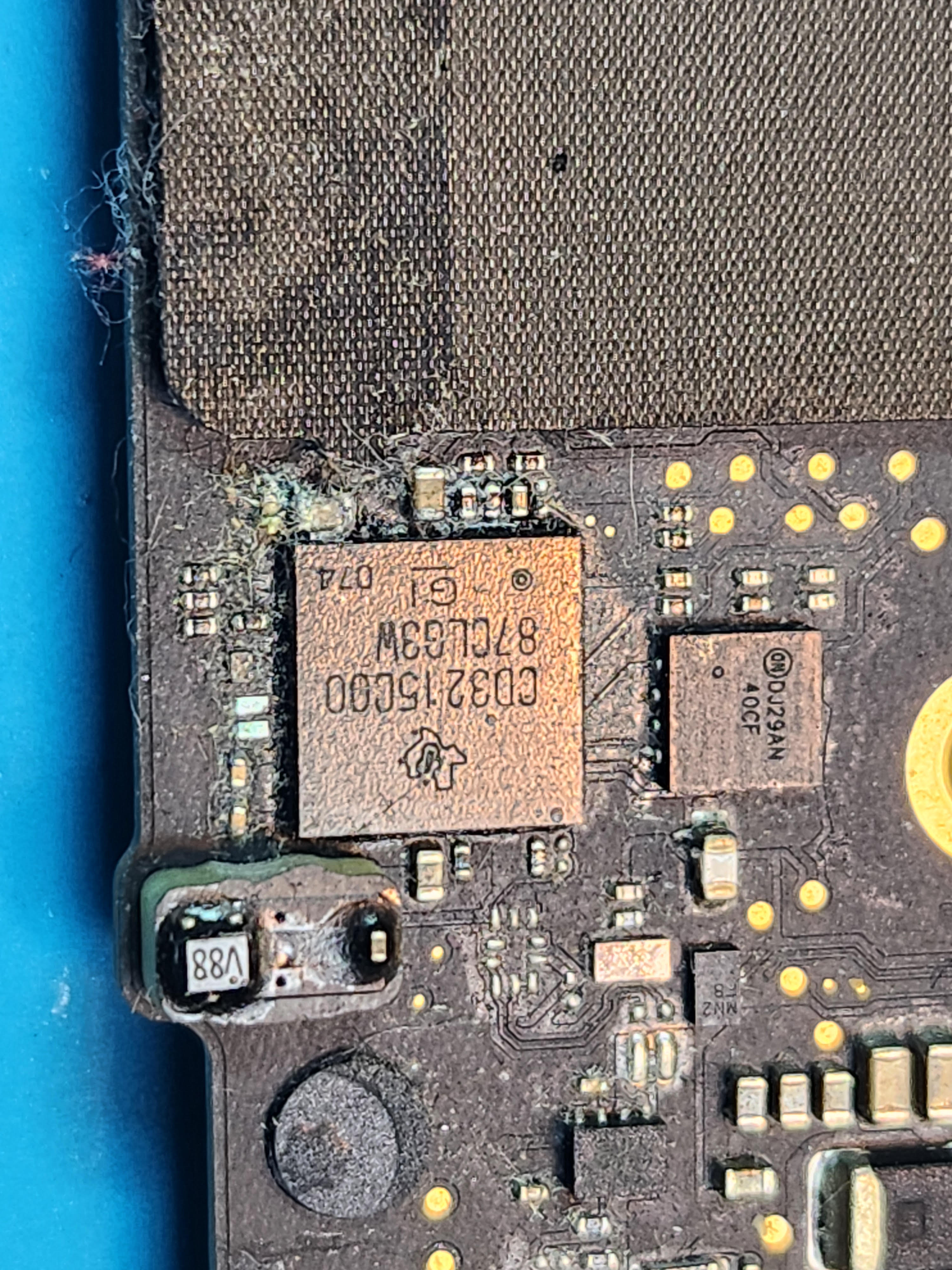
Actual board cleaned at The Mac Space - corrosion removed with our ultrasonic cleaning process
Step 4 - Isopropyl Alcohol Bath
Straight from the ultrasonic cleaner, the board goes into a clear plastic bucket labeled "ALCOHOL BATH" filled with 99.9% isopropyl alcohol. This step serves two purposes: it strips away any remaining cleaning elements from the EC solution, and it displaces all the distilled water from the board. Isopropyl alcohol evaporates much faster and more completely than water, which is exactly what we need before the drying phase.
Step 5 - Oven Drying (Not a Microwave)
The board goes into a mini oven set to 200 degrees Fahrenheit - the lowest setting. We need to stress this: never use a microwave on electronics. A microwave will destroy the board instantly. The mini oven provides gentle, even heat that evaporates any remaining moisture. We dry each side for 4 minutes, 8 minutes total. 200 degrees Fahrenheit is safe for all board components. Going higher is not recommended and risks heat damage to sensitive parts.
Safety note: Proper chemical-resistant gloves are worn throughout this entire process. EC Cleaner is highly effective at removing corrosion, but it is also corrosive and dangerous to skin. Safety first, always.
Step 6 - Testing and Diagnosis
With the board clean and dry, we reassemble and test. This is the moment of truth. In many cases, a thorough ultrasonic cleaning is all it takes to bring a liquid damaged Mac back to life. The corrosion was preventing proper electrical connections, and now those pathways are clear. If the board doesn't power on, we go deeper. Using the damage photos from Step 1 as our guide, we move into component-level logic board diagnostics - probing specific circuits, checking voltages, and identifying which components were damaged beyond what cleaning can fix.
Why Ultrasonic Cleaning Works
Corrosion hides underneath BGA chips, inside connectors, and between board layers. A toothbrush and alcohol can't reach those areas. Ultrasonic cavitation can - the microscopic bubbles clean every surface the liquid touches.
At the right temperature and duration, ultrasonic cleaning removes corrosion without damaging the board, traces, or components. It's the safest deep-cleaning method available for electronics.
Many liquid damaged Macs that appear dead are actually just corroded. The components are fine - they just can't communicate through the corrosion buildup. Remove the corrosion and the board works again.
We use commercial EC Cleaner designed specifically for electronics, not household cleaning solutions. The right chemicals at the right temperature make the difference between a recovered board and a damaged one.
Common Liquid Damage Scenarios We See
Coffee and Tea Spills
The most common. Coffee is acidic and causes fast corrosion. The sugar and cream make it worse by leaving residue that continues corroding even after drying. Ultrasonic cleaning is especially effective here because it removes both the corrosion and the sticky residue.
Water Damage
Plain water causes less immediate damage than other liquids, but minerals in tap water leave conductive deposits that short-circuit board components over time. Even "clean" water damage needs proper ultrasonic cleaning.
Soda and Juice Spills
Sugar-based liquids are the most aggressive. The sugar crystallizes as it dries, trapping moisture against the board and accelerating corrosion. These boards often look the worst but can still recover with thorough cleaning.
Rain and Humidity
MacBooks left in rain or stored in humid environments develop slow corrosion that spreads gradually. By the time symptoms appear, the damage is widespread. Early cleaning gives the best results.
Ultrasonic Cleaning FAQ
Ultrasonic cleaning is included as part of our liquid damage repair service. We don't charge separately for the cleaning itself - it's part of the diagnostic and repair process. Book an appointment or call us at 470-355-0477 for current pricing on liquid damage repairs.
We don't recommend it. Professional ultrasonic cleaning requires specific equipment, temperature control, and chemical knowledge. EC Cleaner is corrosive to skin and requires proper safety gear. A consumer ultrasonic jewelry cleaner won't produce the same results - the frequency, power, and cleaning solutions are different. The risk of further damage to your board is high without proper training.
If cleaning alone doesn't bring the board back, we move into component-level diagnostics. Using the damage photos taken before cleaning, we probe specific circuits to find which components failed. Many times the corrosion damaged a specific chip or capacitor that can be replaced individually through micro-soldering. We'll give you an honest assessment and quote before doing any additional repair work.
As soon as possible. Corrosion starts immediately and gets worse every day. Power off the device right away - do not try to charge it or turn it on. The sooner we can clean the board, the higher the success rate. Macs brought in within the first few days have significantly better outcomes than those that sit for weeks or months.
Because ultrasonic cleaning removes all visible corrosion - that's the whole point. But if cleaning alone doesn't fix the board, we need to know exactly where the damage was concentrated. Those photos become our diagnostic roadmap, showing us where to start probing and testing. Without them, we'd be searching blind across hundreds of components. It's a small step that saves significant diagnostic time.
Mac Got Wet? We Can Help.
Professional ultrasonic cleaning and liquid damage recovery. The sooner you bring it in, the better the outcome.
Related Guides
Learn more about liquid damage and Mac repair:
The Mac Space - Marietta, GA
2200 Roswell Rd. Suite 130, Marietta, GA 30062
Association Hours (subject to change): Mon-Fri 11AM-6PM